What makes the Boox Palma 2 Pro different from a standard e-reader?
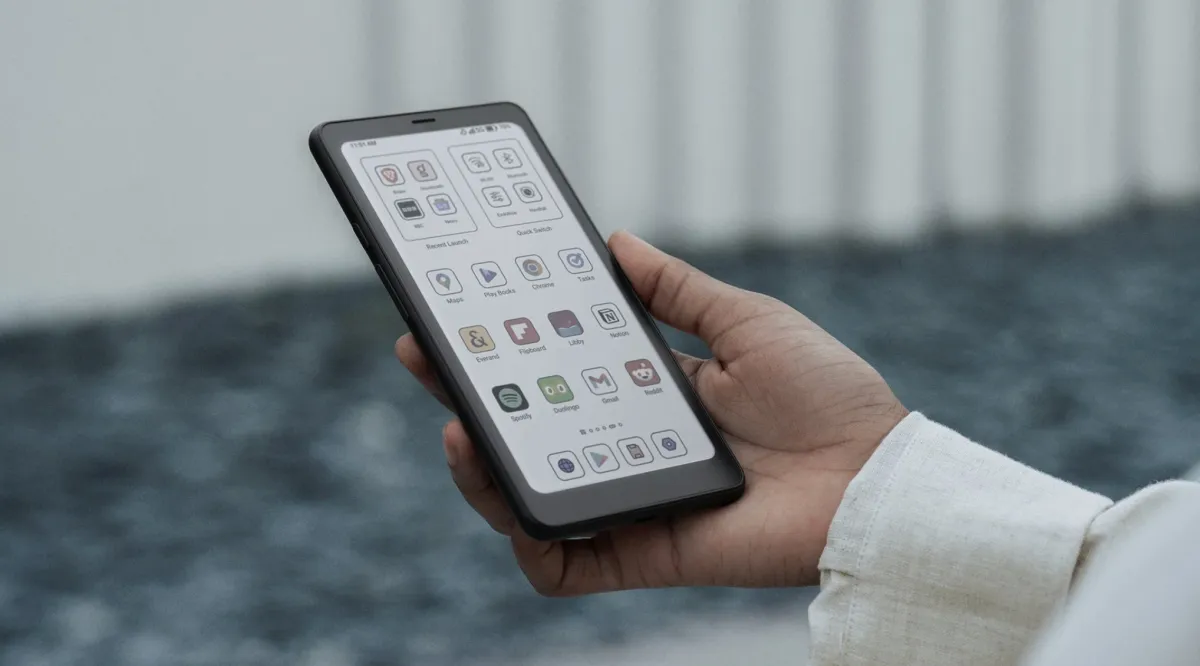
The Boox Palma 2 Pro distinguishes itself by adopting a smartphone-inspired form factor combined with the eye-friendly benefits of E Ink technology. While most e-readers are larger, squarish devices that often require extra grip or accessories to hold comfortably, the Palma 2 Pro is designed for one-handed use and extreme portability. At just 175 grams, it is significantly lighter than many modern smartphones, making it an ideal companion for reading in cramped positions, such as lying on one's side in bed.
Unlike closed ecosystems like the Amazon Kindle, the Palma 2 Pro operates on Android. This software choice is a critical differentiator, as it provides access to the Google Play Store. Users are not restricted to a single proprietary storefront; instead, they can download a wide array of applications including Kindle, Kobo, Libby, and various podcast or audiobook services. This versatility transforms the device from a simple reader into a multipurpose tool for research, productivity, and media consumption.
A hybrid approach to reading
The device essentially functions as a hybrid between a compact Android tablet and a dedicated e-reader. This means that while you benefit from the lack of blue-light strain, you also retain the digital flexibility of a mobile device. However, this hybrid nature comes with trade-offs in user experience, particularly regarding how software interacts with the E Ink screen.
How does the display perform for long-term reading?
The E Ink display on the Boox Palma 2 Pro is specifically optimized to reduce the eye strain and headaches often associated with prolonged smartphone use. One of its most practical features is the front-lit screen, which offers adjustable color temperatures. Users can switch between cool and warm lighting, a feature that is particularly beneficial for nighttime reading. The ability to dim the screen to exceptionally low levels allows for reading in total darkness without disturbing others in the room.
While the device is capable of displaying color, users should manage their expectations regarding visual fidelity. Compared to the vibrant, high-contrast screens of modern smartphones, the color on the Palma 2 Pro appears significantly less saturated. This makes it excellent for text-heavy documents and articles, but less ideal for media that relies on high-definition color accuracy. Additionally, the E Ink technology introduces a phenomenon known as "ghosting," where remnants of text from previous pages linger on the screen after a page turn.
To combat this, Boox has included a refresh button within the navigation bar. While this allows users to quickly clear the screen and maintain clarity, the necessity of manual intervention may be a point of friction for readers accustomed to the instantaneous, seamless transitions of LCD or OLED screens.
What are the practical advantages of the Android integration?
The integration of Android allows the Boox Palma 2 Pro to serve as a highly versatile tool for various digital tasks. Because it supports standard Android apps, the device is not limited to a single reading format or service. Users can manage their reading lists across multiple platforms, such as using Libby for library books and Kindle for personal purchases, all on a single handheld device.
The utility extends beyond simple reading. The inclusion of a rear camera allows for document scanning, which can be useful for students or professionals who need to digitize physical papers. Furthermore, the device features a built-in speaker, enabling users to listen to audiobooks or podcasts without the need for headphones. A hybrid SIM slot also provides the option for cellular data, ensuring that the device remains connected even when away from Wi-Fi networks.
Navigating the E Ink software experience
It is important to understand that because many Android applications are designed for high-refresh-rate smartphone screens, the experience on the Palma 2 Pro can feel sluggish. Animations, scrolling, and certain user interfaces may lack the smoothness found on a standard mobile device. This lag is a characteristic of the E Ink refresh rate rather than a lack of processing power, and users must adapt to a slower, more deliberate way of interacting with their apps.
How does the battery life and hardware compare to competitors?
Battery performance is an area where the Boox Palma 2 Pro differs significantly from dedicated e-readers like the Kindle. While a standard e-reader can often last for several weeks on a single charge, the Palma 2 Pro typically offers between 5 and 7 days of usage. This shorter duration is a direct result of the Android operating system and the ability to run more power-intensive third-party applications. To extend this duration, users can opt to disable Wi-Fi when not actively downloading content.
In terms of hardware, the device's compatibility with a stylus offers a layer of productivity that most smartphone-sized devices lack. This allows for note-taking and the ability to annotate PDF documents directly on the screen. While the device's $400 price point is relatively high for an e-reader, the combination of portability, Android versatility, and specialized E Ink hardware positions it as a premium niche product.
Frequently asked questions
Is the Boox Palma 2 Pro better than a Kindle?
It depends on your priorities. If you want a device that lasts for weeks on a single charge and offers a seamless, simple interface, a Kindle is superior. However, if you require Android app support, the ability to use multiple reading platforms, and a more compact form factor, the Palma 2 Pro is a better choice.
Can I use the Boox Palma 2 Pro for social media?
Yes, because it runs Android and supports Google Play, you can download various apps. However, the E Ink screen and slower refresh rates mean that apps designed for fast scrolling and heavy animation, like Instagram or TikTok, will feel sluggish and may not provide a pleasant experience.
Does the device support color reading?
The device is capable of displaying color, but the images will not be as vibrant or saturated as those on a smartphone or tablet. It is best suited for reading text and documents where color is used for highlighting or basic visual distinction rather than high-fidelity photography.
How do I fix the "ghosting" on the screen?
Ghosting occurs when text from a previous page remains visible after you turn the page. You can resolve this by using the refresh button located in the navigation bar, which forces the E Ink screen to clear and reset the display for a clean view.
Is the Boox Palma 2 Pro waterproof?
The provided information does not specify whether the Boox Palma 2 Pro has an official IP rating for water resistance. Users should exercise caution when using the device near water unless official documentation confirms its waterproof capabilities.
Key takeaways
- The Boox Palma 2 Pro features a smartphone-sized E Ink display weighing 175 grams.
- Android integration allows access to Google Play and apps like Kindle, Kobo, and Libby.
- Battery life typically ranges from 5 to 7 days per charge.
- The device includes a rear camera for scanning and a hybrid SIM slot for cellular data.
- The $400 price point reflects its specialized, versatile hardware design.
Conclusion
The Boox Palma 2 Pro occupies a unique niche in the digital reading market. It is not a direct replacement for the long-lasting simplicity of a Kindle, nor is it a replacement for the high-speed performance of a smartphone. Instead, it serves a specific user: the mobile reader who seeks to escape the eye strain of mobile screens without sacrificing the convenience of their favorite apps. While the $400 investment and the characteristic E Ink lag require an adjustment period, the device's portability and versatility offer a compelling solution for modern, on-the-go readers.