How does the CRKD Nitro Deck 2 connect to different devices?
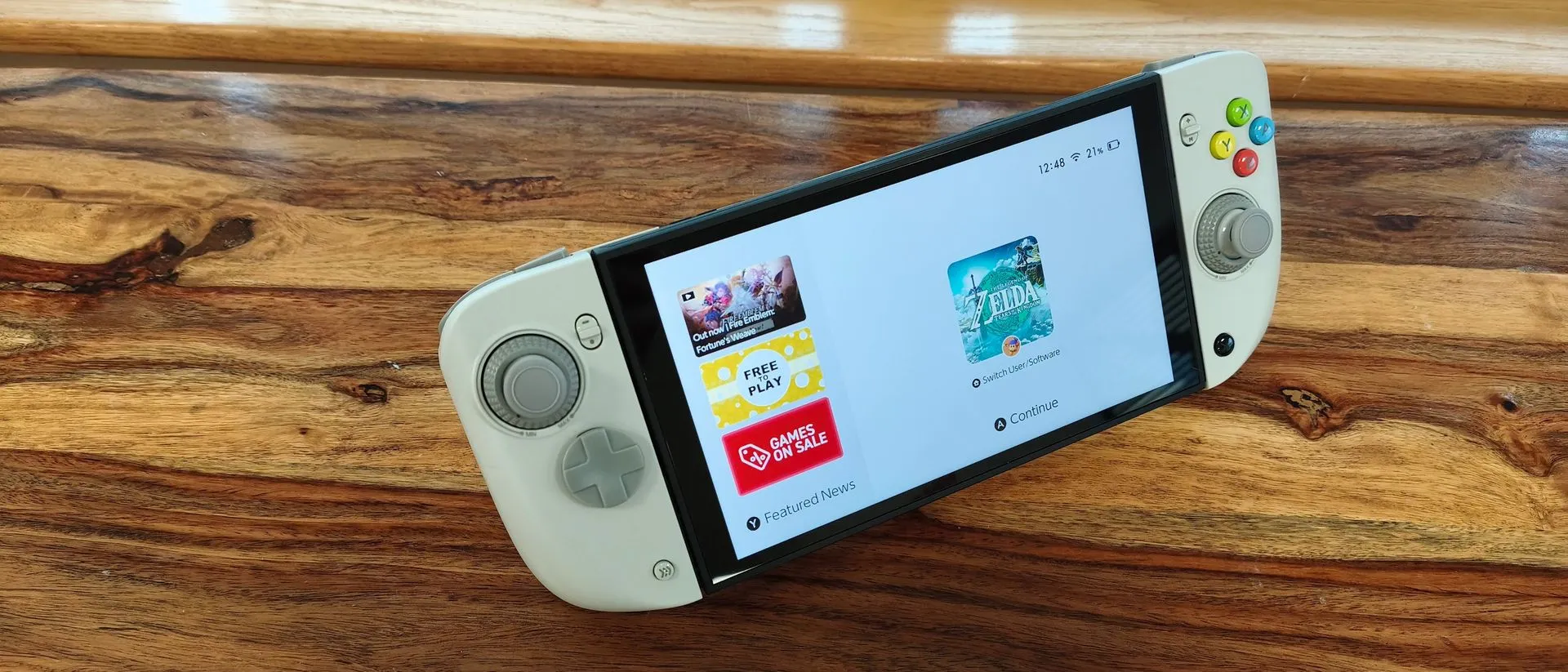
The CRKD Nitro Deck 2 utilizes a dual-connectivity approach, offering both wireless Bluetooth and wired USB-C options to ensure versatility across multiple platforms. When used with Nintendo consoles, the device clamps onto the sides of the unit rather than sliding into the Joy-Con slots, providing a secure fit through a twist-to-tighten mechanism. This ensures the console remains immobile even when the controller is held upside down.
For wired connections to the Switch series, the package includes a U-shaped USB adapter that bridges the connection between the bottom of the Deck and the console. For other platforms, the device functions as a standard gamepad. It is compatible with PC, iOS, and Android devices, making it a comprehensive solution for mobile and desktop gamers alike.
Connectivity and Pairing Nuances
While the Bluetooth pairing process is straightforward for Switch, PC, and mobile devices, the user experience is not entirely seamless. Reconnecting the controller to a console after it has entered sleep mode can take a noticeable amount of time, though the wired mode offers a faster recovery. Additionally, users cannot switch between different paired devices—such as moving from a Switch to an Android phone—without performing a new pairing process each time. This lack of instant device switching is a minor drawback for those who frequently jump between different hardware ecosystems.
What are the standout hardware features of the Nitro Deck 2?
The most significant technical highlight of the CRKD Nitro Deck 2 is its advanced joystick system, which features physical dials to allow users to adjust tension. This level of customization is rare in third-party controllers and allows gamers to tailor the resistance and feel of their movement to their specific preferences. Beyond the sticks, the controller offers several high-quality tactile elements.
The build quality is characterized by a sturdy, solid plastic shell that feels durable once gripped. The buttons provide responsive, "clicky" feedback, and the device includes a metal kickstand that is both robust and capable of folding flush against the back of the unit. For those seeking further customization, the D-pad hat and joystick caps are replaceable, though users should note that no additional sets are included in the standard retail box.
Customization via the CRKD Mobile App
To complement the physical hardware, CRKD provides a dedicated mobile application that allows for deep software-level customization. Through the app, users can remap various inputs and enable a specialized "No Deadzone" mode for the joysticks to increase sensitivity. The interface is described as clear and easy to navigate, functioning without the bugs often found in similar third-party software. However, there is a procedural inconvenience: users must re-engage with the app by holding two specific buttons for three seconds every time it is opened, which can hinder quick, on-the-fly adjustments during a gaming session.
Is the CRKD Nitro Deck 2 comfortable for long sessions?
Ergonomics present a mixed experience, as the Nitro Deck 2 prioritizes a secure, functional grip over pure handheld comfort. One notable design choice is that the controller pads angle inwards at the bottom, which deviates from the standard layout of most modern gamepads. This, combined with the overall weight of the unit, can make the controller feel cumbersome, particularly when attempting to play in an upright position.
The weight of the device is a significant factor for handheld users. When the controller is loaded with a console, the combined mass increases, which may lead to hand fatigue during extended play sessions. While the clamping mechanism is exceptionally secure, ensuring the console does not shift, the physical footprint and weight distribution are trade-offs for the stability and protection the device provides.
Design Aesthetics and Build Integrity
Despite the ergonomic challenges, the design is functional and aesthetically pleasing in certain configurations. The "Pal Grey" variant, for example, utilizes a retro-inspired color palette with colorful face buttons and dark grey accents reminiscent of classic Nintendo hardware. The sliding mechanisms for the pads operate smoothly, and the overall construction feels solid and dependable, even if the initial tactile impression of the plastic is not immediately premium.
How does the Nitro Deck 2 compare to the competition?
At a price point of $89.99 (£89.99 / AU$161), the CRKD Nitro Deck 2 positions itself as a high-value, all-in-one solution. It distinguishes itself by acting as a protective case, a dedicated Switch/Switch 2 grip, and a standalone gamepad for other devices. This multi-purpose nature makes it more versatile than many single-use accessories.
When compared to other available options, the market offers several different approaches to the handheld experience:
- Mobapad M12 HD / M12S: These serve as more direct third-party substitutes for the Joy-Con 2 controllers themselves.
- GameSir G8+: A Bluetooth mobile controller that, while not officially supporting the Switch 2, has shown compatibility through user reports.
- Genki Attack Vector: A more budget-friendly option for those who want to keep their original Joy-Con 2 pads but add ergonomic grips and a backplate.
The Nitro Deck 2 remains a unique choice for users seeking a complete, protective, and highly customizable ecosystem for their handheld Nintendo hardware.
Frequently asked questions
Does the CRKD Nitro Deck 2 work with the original Nintendo Switch?
Yes, the Nitro Deck 2 is fully compatible with both the original Nintendo Switch and the Nintendo Switch 2. It includes a legacy adapter to ensure the USB-C port remains accessible, allowing for a wired connection to older console models.
How long does the battery last on a single charge?
The battery life of the CRKD Nitro Deck 2 is rated between 15 and 20 hours. Testing confirms that the device meets these manufacturer claims, providing sufficient power for extended gaming sessions without frequent recharging.
Can I adjust the joystick sensitivity?
Yes, you can increase joystick sensitivity by using the CRKD mobile app to enable the "No Deadzone" mode. Additionally, the hardware features physical dials on the joysticks that allow you to manually adjust the tension of the sticks.
Is the controller heavy to hold?
The controller itself weighs approximately 363g (12.8oz), and it becomes heavier once the console is clamped into it. Some users may find this weight and the inward-angled grips to be cumbersome during long, upright gaming sessions.
Does it work with PC and mobile devices?
The Nitro Deck 2 functions as a standalone gamepad for PC, iOS, and Android devices. It can connect via Bluetooth or through a wired connection, making it a versatile tool for gaming beyond the Nintendo ecosystem.
Key takeaways
- The Nitro Deck 2 offers adjustable joystick tension via physical dials for customized feel.
- It is compatible with Nintendo Switch, Switch 2, PC, iOS, and Android platforms.
- The device provides 15 to 20 hours of battery life per charge.
- A secure clamping mechanism ensures the console remains stable during gameplay.
- The unit functions as both a protective case and a versatile standalone gamepad.
Conclusion
The CRKD Nitro Deck 2 is a highly versatile accessory that successfully bridges the gap between a protective carrying case and a high-performance gaming controller. Its standout feature—adjustable joystick tension—and its multi-platform compatibility provide significant value for the $89.99 price point. While the added weight and specific ergonomic angles may cause discomfort for some players during long sessions, its build quality and robust clamping mechanism make it a reliable companion for both Nintendo Switch and Switch 2 owners. For gamers seeking a comprehensive, all-in-one handheld solution, the Nitro Deck 2 is a strong contender.