
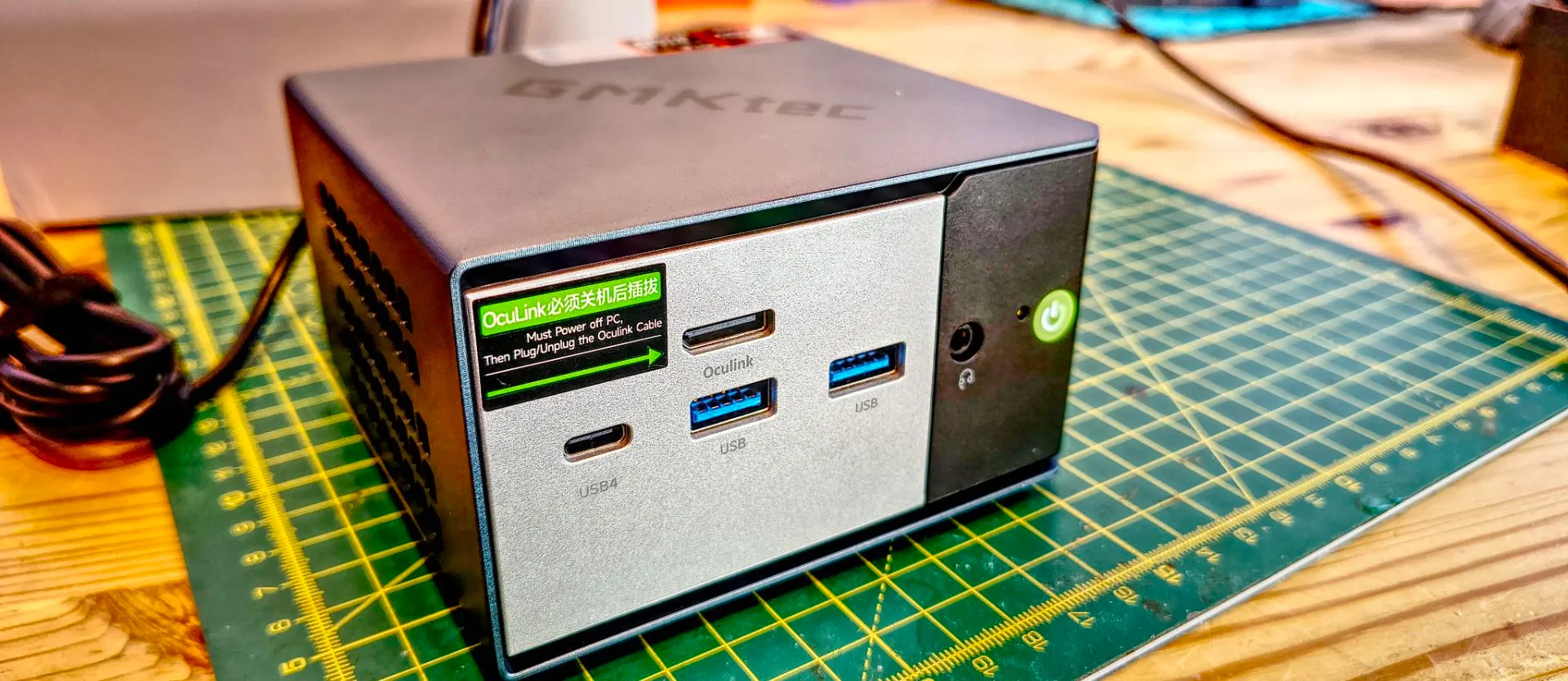
What makes the GMKTec NucBox EVO-X1 Pro unique?
The GMKTec NucBox EVO-X1 Pro distinguishes itself through the integration of AMD's latest Ryzen AI 400 family, specifically the HX 470 silicon codenamed Gorgon Point. This architecture utilizes Zen 5 cores to deliver high-tier computing capabilities in a compact form factor. Unlike many budget mini PCs, this model focuses on high-speed throughput and AI readiness, boasting an NPU capable of up to 55 TOPS (Int8) and a total platform AI performance of up to 86 TOPS across the CPU, GPU, and NPU.
The hardware configuration is specifically tailored for speed. It ships with 64GB of onboard LPDDR5 memory running at 6400MT/s. While this provides massive bandwidth for the Radeon 890M GPU, it is important to note that the memory is soldered to the motherboard and cannot be upgraded by the user. This design choice prioritizes performance and physical compactness over modularity, a common trade-off in the high-end mini PC market.
How does the design and thermal management perform?
The chassis maintains the proven metal enclosure from the original EVO X1 released in late 2024, measuring approximately 110 x 107 x 63mm and weighing around 590g. This compact footprint allows the device to sit easily on a desk or be mounted to the rear of a monitor. Despite its small size, the cooling solution is robust, utilizing a dual-fan layout consisting of one fan dedicated to the processor and a second for general system cooling.
Thermal performance is notable for its balance between noise and heat dissipation. While the original EVO X1 faced criticism regarding fan noise, the Pro model remains extremely quiet even when subjected to heavy benchmarking stress. However, users should be aware that the air exhausted from the sides becomes noticeably warm when the system is operating in Performance Mode (up to 65W). The cooling system offers three distinct profiles: Silent Mode (35W), Balanced Mode (54W), and Performance Mode.
Internal accessibility and expansion options
While the external design looks sturdy, accessing the internals requires more than just removing the threaded feet. After detaching the metal casing, a screwdriver is necessary to remove the fan housing. Once inside, users find that while the RAM is inaccessible, storage expansion is highly flexible. The device includes two M.2 2280 NVMe PCIe 4.0 x4 slots. With a single 2280 drive capable of reaching 8TB, the system theoretically supports a massive 16TB of total storage capacity.
What is the port selection and connectivity like?
The port selection on the NucBox EVO-X1 Pro is comprehensive, catering to professional workflows and high-end peripheral needs. The front of the unit features a high-speed USB4 port (40Gbps, supporting Power Delivery 3.0 and Display Output), an OCuLink port for external GPU connectivity, two USB 3.2 Gen 2 ports, and a 3.5mm audio jack. The rear panel provides additional connectivity with two 2.5GbE LAN ports, two USB 3.2 Gen 2 Type-A ports, an HDMI 2.1 port, and a DisplayPort 2.1 port.
This variety allows for significant multi-monitor setups. By utilizing the USB4 port with an appropriate adapter alongside the dedicated HDMI and DisplayPort outputs, users can drive three displays simultaneously, with both HDMI and DisplayPort supporting up to 8K resolution at 60Hz. The inclusion of dual 2.5GbE LAN ports makes this an attractive option for networking enthusiasts or those running home lab environments. Connectivity is further bolstered by the inclusion of WiFi 7 and Bluetooth 5.4.
A note on port labeling
One minor ergonomic drawback is the lack of detailed labeling on the ports. While labels exist, they lack specificity; for instance, the USB-A ports are simply marked as 'USB' without indicating their Gen speed, and the dual Ethernet ports are labeled merely as 'LAN' without distinguishing their port numbers or specific speeds.
How does it compare to the competition in terms of value?
Pricing for the GMKTec NucBox EVO-X1 Pro places it in the premium tier of the mini PC market. In the US, the 64GB/1TB configuration is listed at $1,599.99, with a 2TB option available for $1,769.99. While these prices are competitive for the level of silicon provided, they reflect a specific philosophy: high-speed soldered memory versus the modularity found in rival products.
When compared to other manufacturers, the trade-offs become clearer:
| Model | Memory Type | Price (64GB+1TB approx.) | Key Advantage |
|---|---|---|---|
| GMKTec EVO-X1 Pro | Soldered LPDDR5 | $1,599.99 | Higher memory speed (6400MT/s) |
| MINISFORUM AI X1 Pro-470 | Socketed DDR5 | $1,655.00 | Upgradable memory |
| Beelink SER10 MAX | Socketed DDR5 | $1,699.00 | Upgradable memory |
| Geekom A9 Max (2026) | Socketed DDR5 | $1,519.00 (32GB) | Upgradable to 128GB |
The MINISFORUM and Beelink alternatives offer the flexibility of socketed memory, allowing users to upgrade their RAM later, though this typically results in slightly slower memory speeds compared to the EVO-X1 Pro's soldered LPDDR5. For users who prioritize raw, immediate performance and high bandwidth for AI and GPU tasks, the GMKTec model is a strong contender, whereas those seeking longevity through hardware upgrades may prefer the socketed competitors.
Frequently asked questions
Can I upgrade the RAM in the GMKTec NucBox EVO-X1 Pro?
No, the memory in this specific model is soldered directly to the mainboard. While the AMD platform is capable of addressing much larger capacities, you cannot add more physical RAM to the existing hardware once purchased. You must choose your capacity at the time of purchase.
Does this mini PC support external graphics cards?
Yes, the NucBox EVO-X1 Pro includes a dedicated OCuLink port (PCIe 4.0 x4), which provides a high-bandwidth connection for external GPUs. Additionally, the USB4 port can be used for external peripherals and displays, offering versatile options for expanding graphical performance.
How many monitors can I connect at once?
You can connect up to three monitors simultaneously. This is achieved by using the HDMI 2.1 port, the DisplayPort 2.1 port, and the USB4 port (via an adapter) located on the front of the device. All three outputs are capable of high resolutions, including 8K at 60Hz.
What is the difference between the HX 370 and HX 470 models?
The HX 470 is a higher-tier model within the Ryzen AI 400 family, offering increased processing power and performance compared to the HX 370. The HX 370 model is available as a more budget-friendly option with 32GB of RAM, but it lacks the top-end specifications of the Pro version.
Is the cooling system loud during heavy tasks?
The dual-fan cooling system is designed to be extremely quiet, even during intensive benchmarking. While the system remains much quieter than previous iterations, users may notice warmer exhaust air from the sides when the device is set to its maximum Performance Mode.
Key takeaways
- The AMD Ryzen AI 9 HX 470 processor provides high-performance Zen 5 architecture and significant AI processing power.
- The system features 64GB of high-speed LPDDR5 memory, though it is soldered and cannot be upgraded.
- Storage is highly expandable, supporting up to two M.2 2280 NVMe Gen4 SSDs for a potential 16TB capacity.
- Connectivity is excellent, featuring USB4, OCuLink, dual 2.5GbE LAN, and triple 8K-capable display outputs.
Final thoughts
The GMKTec NucBox EVO-X1 Pro is a specialized powerhouse that prioritles speed and compact efficiency. By opting for soldered LPDDR5 memory, it delivers superior bandwidth for the Radeon 890M and AI workloads, though it sacrifices the modularity found in competitors like MINISFORUM or Beelink. For professionals and enthusiasts who require a high-performance, quiet, and ultra-compact workstation with advanced connectivity like OCuLink and WiFi 7, the EVO-X1 Pro represents a cutting-edge solution. However, buyers must be certain of their memory requirements upfront, as hardware upgrades are limited to storage expansion.