How are iPhone Duo apps utilizing the dual-screen hardware?
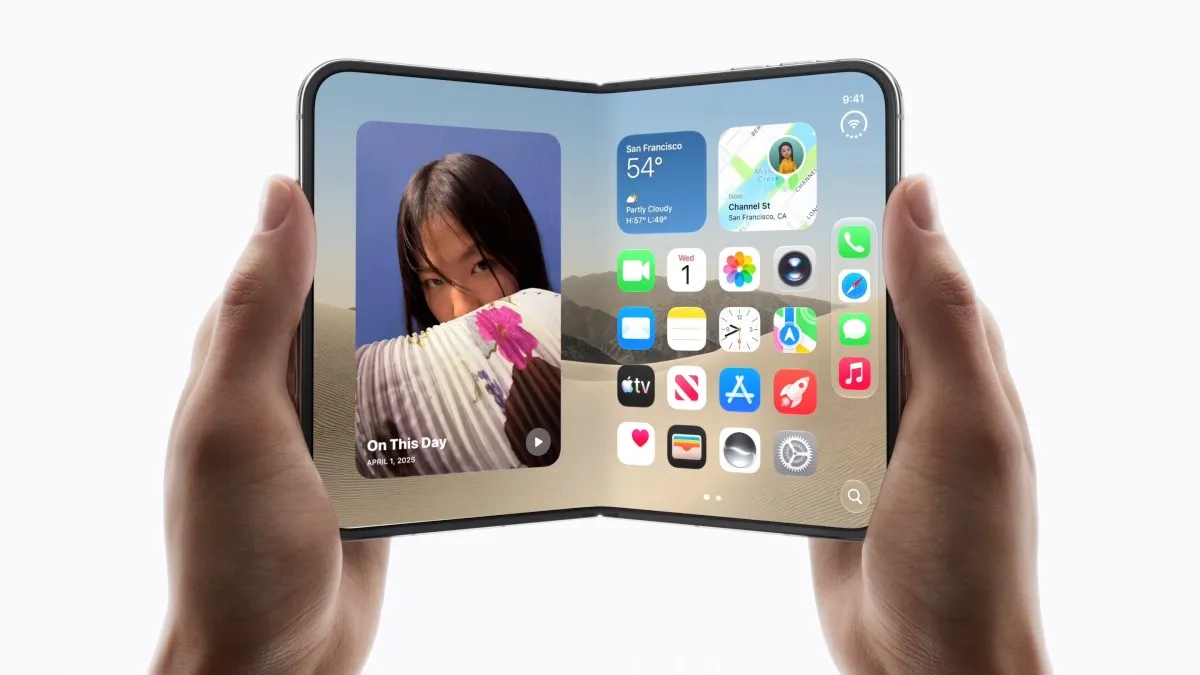
Developers are moving beyond merely resizing existing interfaces to creating entirely new workflows that treat the two screens as distinct functional zones. On the iPhone Duo, the transition between the compact outer display and the expansive inner matte screen allows for a tiered user experience that adapts to how the device is held.
A prime example of this sophisticated approach is found in mainstream streaming services. Rather than just stretching a video to fit a larger area, optimized apps use the outer screen for quick, low-friction interactions and the inner screen for deep engagement. This creates a sense of continuity that mirrors the physical act of unfolding the device.
The transition from outer to inner displays
The most effective apps recognize that the outer screen serves a different psychological purpose than the inner one. The smaller display is ideal for browsing, notifications, or quick glances, while the larger inner display is reserved for intensive tasks like watching high-definition content or editing documents. This hardware-software synergy is what distinguishes the Duo from standard rectangular smartphones.
Which apps showcase the best entertainment experiences?
Netflix serves as a flagship partner for the iPhone Duo launch, demonstrating how professional optimization can enhance media consumption. The app is specifically engineered to handle the device's dual-screen nature, providing a seamless bridge between two different viewing modes.
When the device is folded, users can interact with "Clips," a short-form video feed similar to TikTok, on the outer display. Upon unfolding the phone, the content automatically transitions to the larger, matte-designed inner screen for a more cinematic experience. This functionality addresses a common mobile use case: the desire to shift from quick, casual browsing to focused entertainment without interrupting the flow of content.
How is the 'retro tech' trend appearing in Duo software?
The iPhone Duo is fostering a unique niche for "whimsical" software that celebrates tactile and nostalgic user interfaces. Because the device can fold and mimic the form factor of other objects, developers are creating apps that lean into these physical metaphors.
Deck-Man (formerly known as Duo-Man) is a standout example of this trend. Created by indie developer Vidit Bhargava, the music player reimagines the digital experience through the lens of a classic Walkman cassette player. The app uses the two screens to simulate the mechanics of a portable cassette player:
- The Outer Screen: Acts as the front of a Walkman, providing playback controls like play, pause, and rewind.
- The Inner Screen: Displays the digital cassette and album artwork as it "plays."
This app utilizes authentic-sounding clicks and cassette audio recorded from real hardware, tapping into a cultural movement where users seek intentional, less frantic technology. By using the hinge as a functional element of the UI, Deck-Man provides an experience that would be impossible on a traditional smartphone.
Can productivity and wellness apps adapt to foldable form factors?
Productivity and wellness applications are finding success by utilizing the iPhone Duo's ability to sit in various positions, such as "tent mode" or a laptop-like configuration. This flexibility allows apps to change their layout based on the physical angle of the device.
The workout app Wakeout, a former Apple App of the Year winner, has implemented highly thoughtful UI shifts for the Duo. The app recognizes four distinct device positions:
- Closed: Navigation tabs transform into a slim side menu to maximize the small screen's real estate.
- Open (Book mode): The screen is split across the hinge, with movement videos on one side.
- Open (Laptop mode): The interface shifts to prioritize the vertical screen for better viewing angles.
- Tent mode: The device is propped up, allowing users to follow exercise videos hands-free.
Similarly, creative tools like TypeDraw are leaning into the notebook aesthetic. TypeDraw functions as a virtual Moleskine, where the closed device resembles a small journal. The app includes tactile animations, such as the sound and visual of an elastic band being pulled, and allows users to choose various paper textures (lined, grid, or dotted) and custom handwriting fonts. This transforms the Duo from a mere communication tool into a dedicated digital stationery device.
What is the current state of mainstream app optimization?
While the specialized developer community is thriving, the broader iOS ecosystem is still in a transitional phase regarding the iPhone Duo. Many mainstream applications have not yet undergone the rigorous optimization required to fully utilize the foldable screen.
Users may encounter several common issues when using non-optimized apps:
- Black Bars: Apps designed for standard aspect ratios may leave significant unused space on the edges.
- Displaced Controls: User interface elements may appear in awkward or hard-to-reach locations due to the hinge placement.
- Scaling Issues: Some apps require manual tapping to enlarge content, similar to the experience of running early iPhone apps on the iPad.
However, the presence of early partners like Slack, MLB, NYT Cooking, and Fantastical suggests that the transition toward a fully optimized ecosystem is well underway. As more developers recognize the Duo's unique potential, the gap between standard iOS apps and Duo-optimized software is expected to close.
Frequently asked questions
What is the starting price of the iPhone Duo?
The iPhone Duo starts at a price point of $2,000. This premium positioning reflects the advanced foldable technology and the specialized hardware required to support the dual-screen experience and the unique hinge mechanism.
Are all iPhone apps compatible with the iPhone Duo?
Yes, standard iOS apps will run on the iPhone Duo, but they may not be optimized. This means some apps might display black bars or have controls in unusual positions until developers release specific updates for the foldable form factor.
Can the iPhone Duo be used as a laptop?
While it is not a full laptop replacement, the iPhone Duo can be used in a laptop-like configuration. Apps like Wakeout are designed to adapt their interface when the device is propped up in this manner, making it useful for hands-free tasks.
What makes the iPhone Duo different from previous iPhones?
Unlike previous models that focused on incremental upgrades like speed or camera improvements, the iPhone Duo introduces a foldable form factor. This allows for a more versatile user experience, including different screen sizes and multi-angle usage modes.
Is there a benefit to using the Duo for watching movies?
Yes, the device features a larger inner matte screen that is ideal for video consumption. Apps like Netflix are optimized to transition from short-form content on the outer screen to immersive viewing on the larger inner display.
Key takeaways
- iPhone Duo apps leverage dual screens to provide distinct functionalities for outer and inner displays.
- Netflix is a key partner, offering seamless transitions from short-form clips to full-screen video.
- Indie apps like Deck-Man use the hinge to create nostalgic, retro-tech experiences.
- Productivity apps like Wakeout utilize tent and laptop modes for hands-free utility.
- Mainstream app optimization is ongoing, with some apps still requiring manual scaling.
The evolution of mobile interaction
The iPhone Duo represents a significant shift in the mobile landscape, moving away from the static rectangular design that has defined smartphones for over a decade. By providing a platform that rewards creative software design, Apple is encouraging a new era of interaction where the physical shape of the device is as important as the software running on it. While the ecosystem is still maturing, the emergence of highly specialized apps suggests that the foldable format will eventually move from a niche novelty to a central pillar of the mobile experience.