How do Sonos Play portable surrounds function as dynamic rear channels?
The ability to repurpose portable speakers as rear surrounds relies on a combination of hardware sensors and advanced software integration within the Sonos27 operating system. Unlike traditional home theater setups that require permanent wiring or static wireless connections, this new method treats the speaker as a fluid component of the ecosystem.
When a user decides to move a speaker, the system must recognize the change in intent and environment. This is achieved through several integrated technologies:
- Accelerometers: Each Play speaker contains an internal accelerometer that detects physical movement, signaling the system that the device is being relocated.
- Sonos Positioning Technology: This system uses near-ultrasonic signals to map the environment. The soundbar's microphones pick up these signals to determine the speaker's proximity and orientation.
- Automatic Channel Assignment: The technology can identify which speaker is positioned on the left or right, eliminating the need for manual channel assignment in the app.
The transition process is designed to be seamless. When a Play is picked up, it should ideally disconnect from the home theater group and appear as an independent unit in AirPlay or Sonos settings. Upon returning it to its original location, a breathing white light indicates the system is recalculating its position, followed by an audible tone to confirm it has rejoined the surround array.
What is the real-world reliability of the automatic switching feature?
While the theoretical implementation of the Sonos27 operating system is highly sophisticated, real-world testing reveals that the transition between modes can occasionally encounter software friction. The automation is not always instantaneous or error-free upon the first attempt.
During initial testing, moving a Play speaker from a bedroom to a living room resulted in the device continuing to play the home theater audio stream rather than switching to standalone mode. In some instances, the connection became intermittent, causing audio to cut in and out. In these specific cases, users may need to manually trigger the 'Stop Using Surrounds' command within the Sonos app to force the speaker into an independent state.
However, once the initial handshake is established, the system proves its capability. After a successful manual reset, the speaker correctly transitioned to a standalone device, appearing in AirPlay settings. The return trip to the original position was more reliable, with the speaker successfully detecting its placement relative to the soundbar and re-establishing its role as a rear-left or rear-right surround through automated detection.
How does the Beam Ultra perform with Play surrounds?
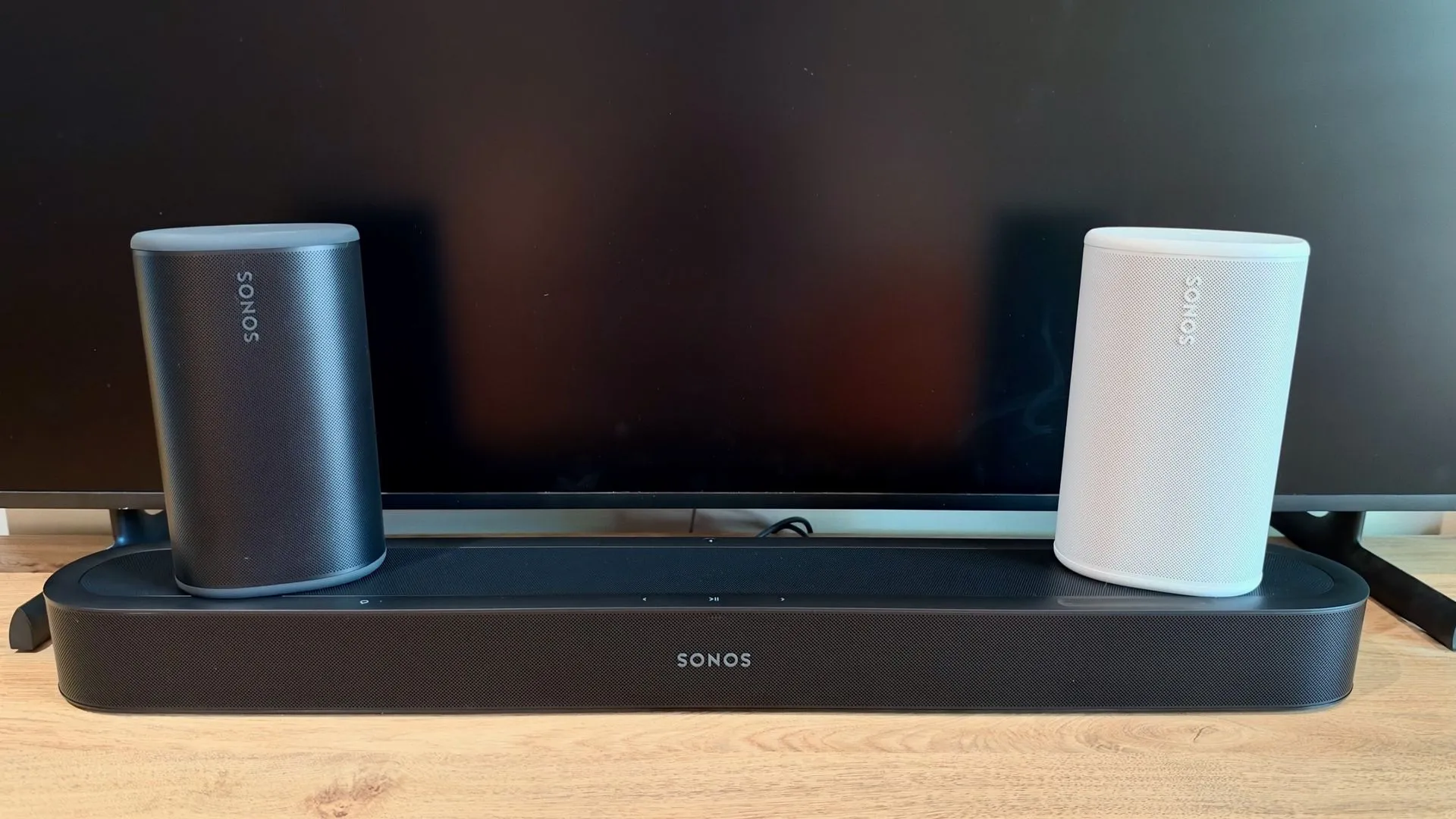
The Beam Ultra delivers a surprisingly expansive soundstage despite its relatively compact physical footprint. When tested without a dedicated subwoofer, the soundbar demonstrates significant authority in the low-frequency range, providing enough weight to fill a smaller room like a bedroom without immediate dissatisfaction.
The integration of Play speakers as surrounds significantly enhances the immersion provided by the Beam Ultra. By adding rear-channel effects, the soundstage expands from a single point beneath the television to a full environmental experience. This is particularly evident during high-action sequences where directional audio—such as the sound of vehicles passing behind the listener—becomes much more distinct.
Optimizing the audio settings for immersion
The user experience can be further refined by adjusting the software-driven surround and height audio levels. Testing suggests that while default settings provide a solid foundation, increasing these levels to +5 provides a more enveloping sensation. At higher settings, specific acoustic details, such as car horns or the chaotic movement of objects in a scene, become easier to isolate and track spatially, making the listener feel embedded within the media.
How does this setup compare to larger systems like the Sonos Arc?
Choosing between a compact Beam Ultra setup and a larger Sonos Arc system involves a trade-off between sheer acoustic power and clarity. While the Beam Ultra offers impressive versatility, the Arc remains the superior choice for larger living spaces where maximum volume and low-end impact are required.
A comparison between the two configurations highlights distinct sonic profiles:
| Feature | Beam Ultra + Play Surrounds | Sonos Arc + Sonos One Surrounds |
|---|---|---|
| Sound Authority | Compact, clear, and surprisingly weighty for its size. | Substantial, high-volume, and deep low-frequency impact. |
| Dialogue Clarity | Superior; voices are more distinct and sharp. | Good, but slightly less defined than the Beam Ultra. |
| Setup Complexity | Low; Play speakers use automatic positioning. | Moderate; Sonos Ones often require manual channel assignment. |
| Spatial Scale | Enveloping and highly immersive for smaller rooms. | Expansive and authoritative for large environments. |
The Arc-based setup provides a more traditional "big theater" sound, with greater low-frequency weight in car engines and moving objects. However, the Beam Ultra compensates with its ability to reproduce higher frequencies more effectively, ensuring that dialogue remains crisp even during intense action sequences. Furthermore, the ease of using Play speakers as surrounds provides a level of modularity that the older Sonos One models cannot match without more intensive manual configuration.
Key takeaways
- Dynamic Versatility: Sonos Play speakers can switch between standalone music playback and rear surround duties automatically.
- Smart Detection: Accelerometers and near-ultrasonic signals enable the system to detect movement and position.
- Beam Ultra Performance: The Beam Ultra provides high dialogue clarity and impressive bass for its compact size.
- Ease of Use: The Sonos27 OS allows for automatic left/right channel assignment for Play surrounds.
- System Comparison: The Arc offers more power, while the Beam Ultra offers better high-frequency precision.
FAQ: Sonos Play portable surrounds
Can I use any Sonos speaker as a surround?
No, the specific new flexibility described is optimized for the Sonos Play series. While other speakers like the Sonos One can be used as surrounds, they lack the integrated accelerometers and the specific Sonos27 software automation required to switch between standalone and surround modes seamlessly.
Do I need a subwoofer for the Beam Ultra?
It depends on your room size. In smaller environments like a bedroom, the Beam Ultra provides sufficient bass weight on its own. However, for larger living rooms or for users seeking room-shaking low frequencies, adding a Sub Mini or larger Sonos Sub is recommended.
How does the speaker know which side is left or right?
The system uses Sonos Positioning Technology, which employs near-ultrasonic signals. The soundbar's microphones pick up these signals to determine the speaker's exact location and orientation in the room, allowing it to assign the correct channel automatically.
Is the setup process difficult?
For the Play speakers, the process is very simple. You can select 'Use Surrounds' in the Sonos app, and the system handles the connection and positioning. This is significantly easier than older models that required manual channel assignment.
What happens if the automatic connection fails?
If the speaker does not automatically rejoin the system, you can use the Sonos app to manually manage the connection. You may need to select 'Stop Using Surrounds' to use it as a standalone speaker or manually trigger the surround mode.
Conclusion
The introduction of the Sonos Play as a portable surround option represents a significant shift in home theater philosophy. By moving away from static, permanent speaker configurations, Sonos has introduced a level of modularity that suits modern, multi-room living. While the software transition can occasionally require manual intervention, the combination of the Beam Ultra and Play speakers provides a highly immersive, clear, and flexible audio solution. This development successfully bridges the gap between high-fidelity home cinema and the convenience of portable, multi-purpose audio devices.