How does the Ultimate Planner app replicate the paper experience?
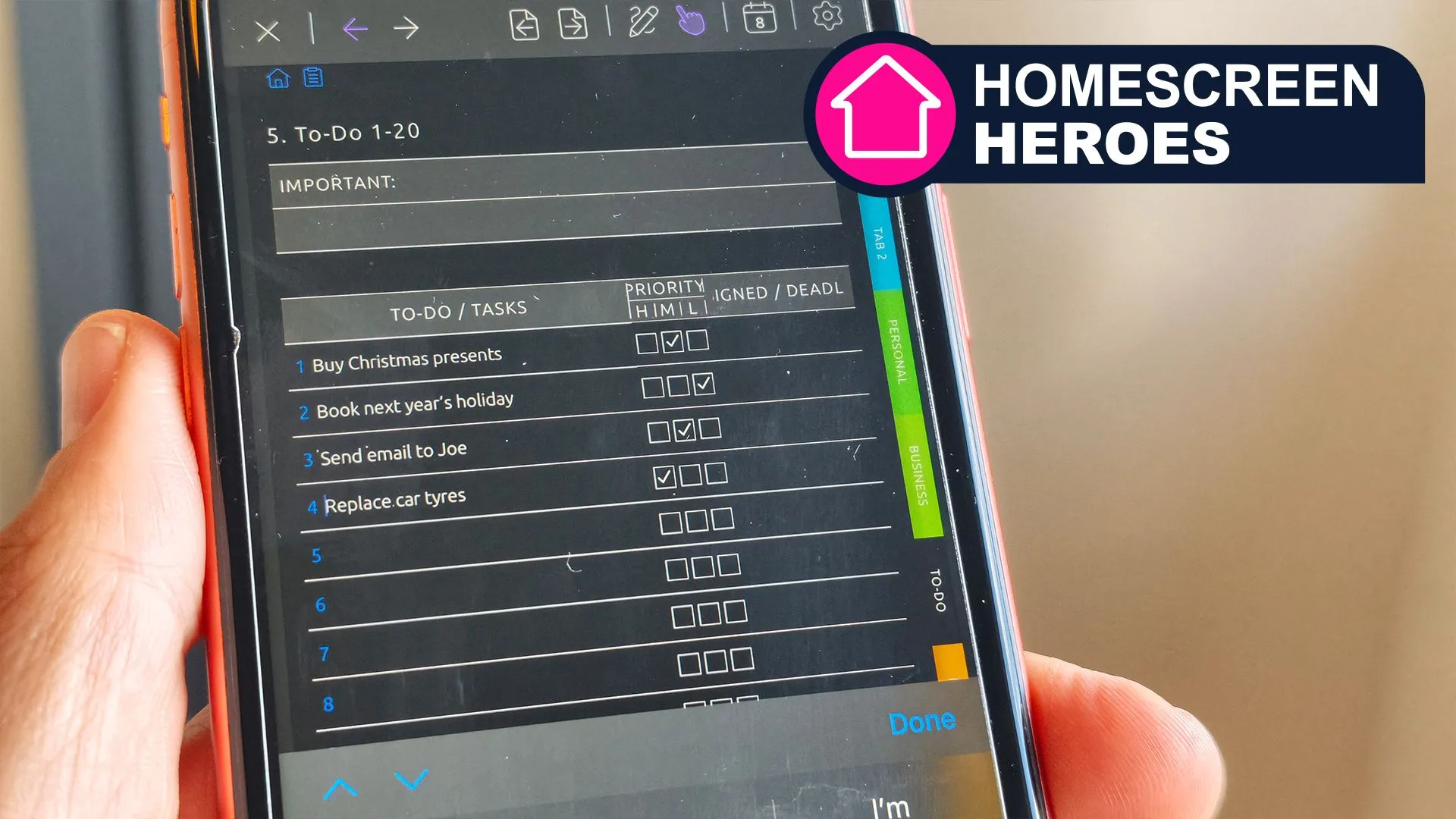
The Ultimate Planner app functions as a digital tool designed to mimic the aesthetic and functional qualities of traditional paper diaries. Unlike standard productivity apps that rely on minimalist, list-based interfaces, this application utilizes layouts inspired by physical notebooks. It incorporates elements such as Filofax-esque tabs to help users navigate different sections of their planning life easily.
One of the standout features for users who prefer handwriting is its stylus compatibility. This allows for a level of tactile engagement that is often missing from purely keyboard-driven applications. By combining the visual cues of a physical planner with the convenience of a digital device, the app aims to provide a sense of organization that feels more personal and less clinical than typical task managers.
Bridging the gap between analog and digital
The transition from paper to digital has often felt like a loss of personality in organization. Traditional planners offer a sense of continuity and a physical space to reflect, whereas digital apps can sometimes feel ephemeral. The Ultimate Planner addresses this by offering templates and aesthetic options that allow users to build a digital environment that feels as intentional as a hand-decorated journal.
What are the core features and customization options?
Customization serves as the foundation of the Ultimate Planner app, which its creators describe as the most customizable digital planner available. The application allows users to manage a wide array of organizational needs, including daily planning, task management, goal setting, and habit tracking. The user experience begins with the selection of a specific planner type, which dictates the tools, tabs, and features accessible within the interface.
Users can choose from several specialized configurations, such as planners tailored for business, teaching, or gratitude journaling. However, the level of freedom depends significantly on the account type. The 'Ultimate Planner' option provides unrestricted access to every feature within the app, though the sheer volume of options can become overwhelming for new users if they attempt to display every single feature simultaneously.
The app also offers unlimited longevity. As one year concludes, the digital environment seamlessly transitions into the next, providing unlimited pages, notebooks, and layouts. This ensures that the user's organizational history remains intact while providing a fresh start for each new calendar year.
Tailoring the workflow to individual needs
Because the app is not a 'one-size-fits-all' solution, users can create bespoke sections to match their specific professional or personal workflows. This is achieved through the use of numerous templates that provide both functional structure and visual inspiration, allowing the planner to act as a reflection of the user's personal style.
What is the pricing structure for Ultimate Planner?
The Ultimate Planner app operates on a tiered model that separates basic functionality from specialized professional tools. While a free account is available to access the core features of the application, users seeking more advanced organizational structures must upgrade to a Pro account.
The Pro version is required to access specialized planner types, such as those designed for business or educational purposes. According to the product details, users can choose between two distinct payment methods for these premium features:
- Annual Subscription: $39.99 or £39.99 per year.
- Lifetime Access: A one-off charge of $69.99 or £69.99.
It is important to note that there is currently no free trial available for the Pro features. However, the Pro version removes limits on the number of planners a user can create, making it a viable option for those who wish to maintain separate digital environments for work and personal life.
Maximizing the value of a Pro account
To get the most out of the investment, Pro users can leverage the ability to create multiple, distinct planners. By separating professional tasks from personal habits and goals, users can prevent their digital workspace from becoming cluttered, effectively utilizing the subscription to manage different facets of their lives independently.
How does the app handle digital synchronization?
Despite its paper-like appearance, the Ultimate Planner app is fully integrated with modern digital ecosystems. A primary strength of the application is its ability to sync seamlessly with one or more digital calendars. This allows users to view their scheduled events alongside their handwritten notes, task lists, and habit trackers in a single unified view.
The synchronization process is highly granular. Within any synced calendar account, users can select specific sub-calendars to display. This functionality is particularly beneficial for professional users who may need to view multiple shared calendars or team schedules without cluttering their personal view. This integration ensures that the planner remains a central hub for all time-management activities.
Data consistency is maintained across all supported platforms. The app is available on several devices, including:
- iPad
- iPhone
- Android devices
- Web browsers
This cross-platform availability means that a user can jot down a quick note on their smartphone while traveling and later expand upon those notes on a tablet or desktop computer when they return to their workspace.
Frequently asked questions
Is there a free version of Ultimate Planner?
Yes, the app offers a free account that allows users to access its core features. This is a useful way to test the interface and basic planning tools before committing to a paid subscription for more advanced, specialized planner types and unlimited customization.
Can I use Ultimate Planner for both work and personal life?
Yes, especially if you use the Pro version. The Pro account allows for an unlimited number of planners, meaning you can create separate, dedicated digital notebooks for your professional tasks and your personal goals, keeping your different life spheres organized and distinct.
Does the app work on Android and iPhone?
The Ultimate Planner app is available for both iOS and Android platforms. Additionally, it can be accessed via web browsers, ensuring that your planning data remains synchronized whether you are using a mobile phone, a tablet, or a computer.
What is the difference between the annual and lifetime plans?
The annual plan costs $39.99/£39.99 per year and provides ongoing access to Pro features through a subscription. The lifetime access option requires a one-off payment of $69.99/£69.99, granting permanent access to the premium features without recurring yearly fees.
Does the app sync with Google or Outlook calendars?
The app is designed to sync with digital calendars, allowing you to view your existing events alongside your planner notes. You can choose which specific calendars to display, making it easy to integrate work or personal schedules into your customized layout.
Key takeaways
- The app replicates a paper diary feel using Filofax-style tabs and stylus support.
- Ultimate Planner offers high customization through bespoke sections and various templates.
- Pro features, including specialized planners, cost $39.99/£39.99 annually or $69.99/£69.99 for lifetime access.
- Full cross-platform synchronization is available for iPad, iPhone, Android, and web.
- Users can integrate existing digital calendars to view events and tasks in one place.
Conclusion
The Ultimate Planner app occupies a unique niche in the productivity market by blending the aesthetic charm of analog journaling with the powerful utility of digital synchronization. While the lack of a free trial for Pro features may be a hurdle for some, the depth of customization and the ability to mirror a physical Filofax experience provide significant value for those seeking a more personal way to organize their lives. By bridging the gap between tactile writing and multi-device connectivity, it offers a comprehensive solution for anyone looking to modernize their planning habits without losing the grounding essence of a traditional diary.